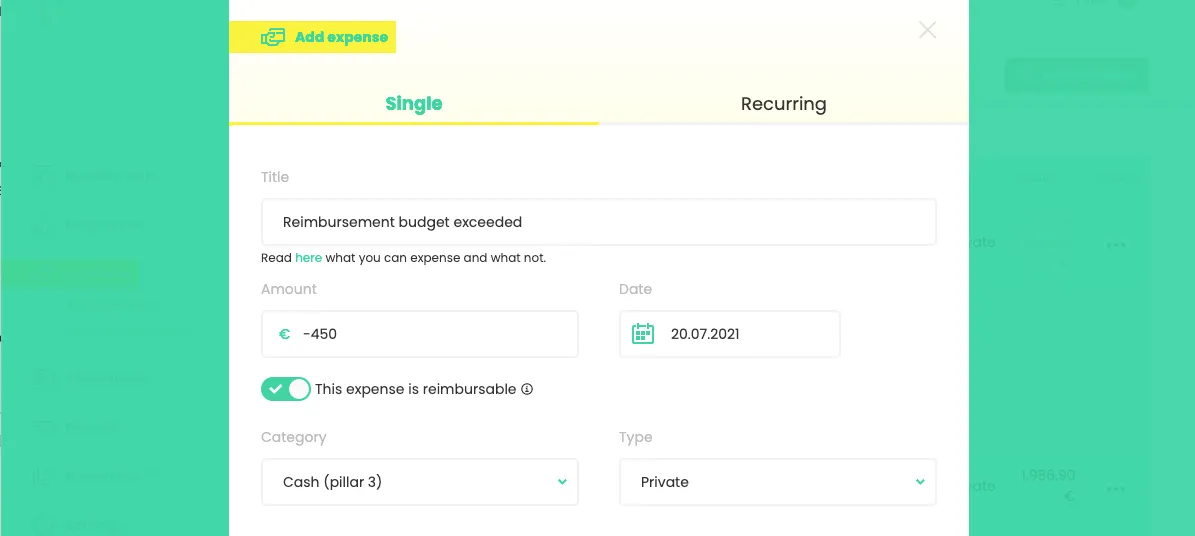
Adding a negative expense in case of reimbursement of exceeded budget
Published on
April 1, 2026

In some situations, it is possible for employees to exceed their mobility budget. Read more about when that can happen here. To claim back the exceeded amount, you can add a negative expense in Mbrella.
How to add a negative expense?
- Click on Add expense
- Enter the amount to be paid back by the employee preceded by a minus sign
- Mark the expense as Reimbursable
- Select the category 'Cash (pillar 3)'
- Click on Save. When exporting this expense to the payroll, the negative amount will be linked to the correct paycode for the net withdrawal salary of the employee.